
BLOG ARTICLE • 5 OCTOBER 2026 • SUGGESTED READING TIME: 9–11 MINUTES
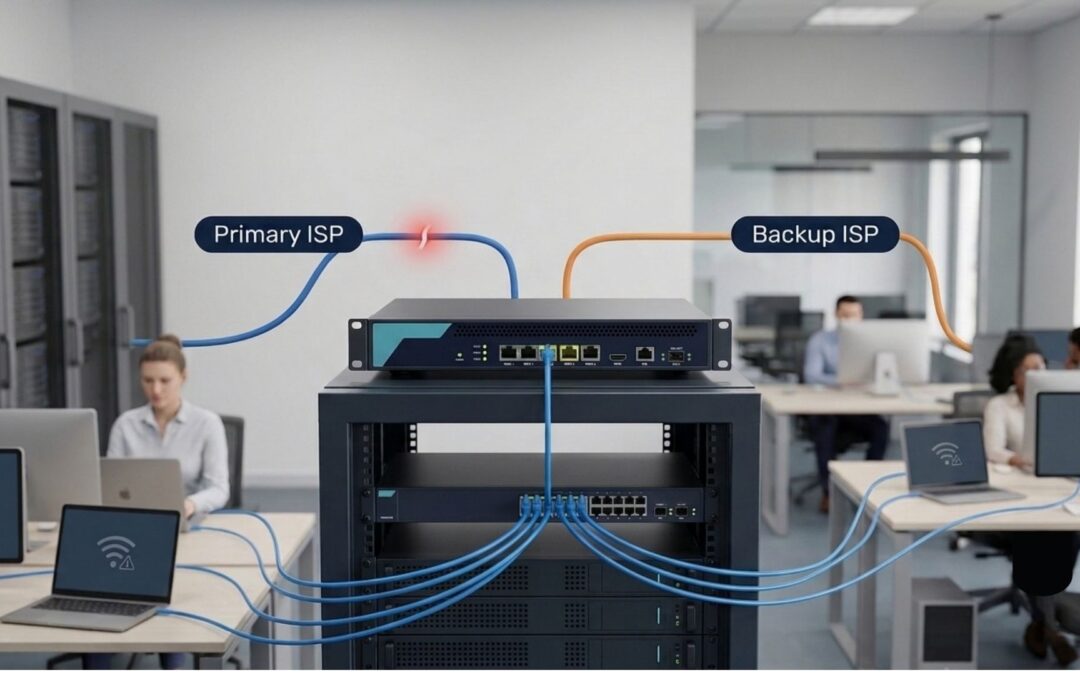
A branch office can have two internet connections and still experience a complete internet outage.
The reason is simple: a backup ISP is only useful when the network can detect a failure, switch traffic correctly, and keep the services the business depends on working.
This guide explains how dual ISP failover works, why it can fail, what to check, and how to test branch office internet resilience before the next real outage.
Quick Answer: Why Can a Branch Go Offline With Two ISPs?
Having two internet connections does not automatically guarantee internet failover.
A branch can still lose connectivity if the firewall cannot detect an upstream ISP failure, routing does not switch correctly, NAT or security policies do not work on the backup WAN, DNS fails, VPN tunnels do not recover, or business applications cannot reconnect after the public IP changes.
A reliable failover design should therefore be tested as a complete path:
Failure detection → Routing → NAT → Security → DNS → VPN → Business applications
The goal is not simply to prove that the second ISP is connected.
The goal is to prove that employees can continue using the services they need when the primary ISP fails.
The Scenario: Two Internet Links, One Branch Still Offline
Imagine a branch office with two internet connections.
The primary ISP handles normal business traffic.
The second ISP is intended to provide backup connectivity if the primary connection fails.
On paper, the branch has internet redundancy.
But when the primary ISP experiences an outage, employees may still report:
- Websites are not loading
- Cloud applications are unavailable
- Microsoft 365 services are disconnected
- VPN connections stop working
- DNS lookups fail
- Some applications work while others do not
- Users need to wait for manual intervention
- The IT team has to change a route or firewall setting
This creates an important distinction:
Two internet connections provide redundancy potential. Tested failover provides resilience.
A backup connection is not valuable if the network cannot use it automatically when the primary path becomes unavailable.
Why Does Dual ISP Failover Fail?
Internet failover can fail at several points between the ISP connection and the application the user is trying to reach.
A typical branch network path looks like:
User → Wi-Fi/LAN → Switch → Firewall → ISP → Internet → Cloud Application
With dual ISP connectivity, the firewall may choose between:
Primary ISP ↔ Secondary ISP
The firewall, routing configuration, health checks, NAT rules, security policies, DNS configuration, VPNs, and application behaviour all influence what happens when the primary path fails.
Link Up Does Not Mean Internet Reachability
One of the most common mistakes is treating a connected WAN interface as proof that the internet is working.
A firewall may show the WAN interface as up, while the actual internet path beyond the ISP gateway is unavailable.
For example:
Firewall → ISP Gateway → Upstream Network → Internet
If the upstream path fails but the local interface remains connected, the firewall may need a deeper health check to recognise the problem.
This is why failover monitoring should test meaningful reachability rather than relying only on physical link status.
Firewall Health Checks May Not Detect Every Failure
A firewall or SD-WAN platform may use health checks to determine whether a WAN connection is usable.
Depending on the platform, monitoring can consider factors such as:
- Reachability
- Packet loss
- Latency
- Jitter
- Probe failures
- Failure thresholds
- Recovery thresholds
The exact behaviour depends on the network platform and configuration.
The important point is that the health check should match the failure the business is trying to detect.
If the configuration detects only a complete physical disconnection, it may not react to a connection that remains technically online but has severe packet loss or upstream reachability problems.
Routing and Route Priorities Can Block Failover
Once the primary path is considered unhealthy, the firewall must know what to do next.
Depending on the network design, this may involve:
- Default routes
- Route priorities
- Static routes
- SD-WAN policies
- Policy-based routing
- Link monitoring
- Application-based routing
If the backup route is incorrectly configured, the secondary ISP may be completely available but still unused.
This leads to an important distinction:
Backup ISP available ≠ backup ISP carrying business traffic.
NAT and Security Policies Must Work on Both WAN Links
Internal devices normally use private IP addresses.
When traffic leaves through the internet, the firewall may translate those addresses using NAT.
If traffic moves from the primary ISP to the secondary ISP, the required NAT and security policies must continue to work through the backup interface.
A successful failover test should therefore verify actual application access.
Simply seeing that the secondary WAN interface is active is not enough.
DNS Can Become a Hidden Failure Point
DNS translates domain names into IP addresses.
Users may therefore experience what appears to be an internet outage when the actual problem is DNS resolution.
During failover, check whether users can:
- Resolve required domain names.
- Reach the resulting destinations.
- Access the applications they need.
This helps separate a WAN connectivity problem from a DNS problem.
What Happens to Active Sessions During ISP Failover?
A WAN failover can change the public source IP used by outbound connections.
When that happens, some existing sessions may not continue seamlessly.
The exact behaviour depends on the application, session design, security controls, and network configuration.
SaaS Applications and Public IP Changes
Cloud applications may respond differently when traffic suddenly comes from a different public IP address.
Some sessions may continue normally.
Others may require:
- Reconnection
- Re-authentication
- Browser refresh
- Application restart
This is why testing only a website is not enough.
A proper failover test should include the applications employees actually use.
For example:
- Microsoft 365
- CRM platforms
- ERP systems
- Cloud storage
- Collaboration applications
- Browser-based business applications
VPN Connections During Failover
VPN services deserve separate testing.
A branch may depend on:
- Site-to-site VPN
- Remote-access VPN
- Cloud VPN
- Partner or vendor VPN
When the WAN path changes, a VPN tunnel may need to renegotiate.
The important question is not:
“Does the backup ISP have internet?”
The better question is:
“Do the VPN services required by the business recover correctly after the WAN changes?”
Why a Ping Test Alone Is Not Enough
Ping is useful for basic connectivity testing.
But a successful ping does not prove that:
- DNS works
- NAT works
- VPN tunnels recover
- Firewall policies work
- SaaS applications work
- Required ports are reachable
- Existing sessions recover
A complete failover test should therefore combine network testing with application testing.
What Should You Check Before Testing Dual ISP Failover?
Before testing a production branch, document the current WAN configuration and agree on the expected behaviour.
ISP Handoffs and Gateway Information
Document the relevant details for both connections:
- ISP
- WAN interface
- Gateway
- Public IP information
- Circuit bandwidth
- Connection type
- ISP support or escalation details
Keep this information in the network documentation or WAN resilience runbook.
Health-Check Targets and Failure Thresholds
Document:
- Health-check destinations
- Probe method
- Probe interval
- Failure threshold
- Recovery threshold
- Latency criteria where applicable
- Packet-loss criteria where applicable
The exact values should be based on the network design and firewall capabilities rather than copied from another environment.
Routing and SD-WAN Rules
Review:
- Primary route
- Backup route
- Route priority
- SD-WAN rules
- Application-based routing
- Link-monitoring settings
- Failover behaviour
- Failback behaviour
The IT team should be able to explain what is expected to happen when the primary WAN becomes unhealthy.
Outbound NAT and Firewall Policies
Check whether the backup WAN can handle the required outbound traffic.
Review:
- NAT rules
- Firewall policies
- Security profiles
- Routing policies
- Internet access rules
A failover path that cannot pass normal business traffic is not a working backup path.
VPN and DNS Configuration
Check all important VPN and DNS dependencies.
Verify that the required services continue to operate after the WAN path changes.
Primary and Secondary WAN Roles
Determine whether the network uses:
Active-standby
The primary ISP carries normal traffic while the secondary ISP remains available as a backup.
Or:
Active-active
Both links carry traffic according to defined routing or SD-WAN policies.
Neither approach is automatically better.
The appropriate design depends on business requirements, firewall capabilities, traffic patterns, risk tolerance, and operational requirements.
How to Test Branch Office Internet Failover
Failover should be tested during an approved maintenance window rather than discovered accidentally during a real outage.
The test should be controlled, documented, and repeatable.
Step 1: Document the Current WAN Setup
Before testing, record the normal network state.
Capture:
- Primary WAN status
- Secondary WAN status
- Public IP
- Routing state
- DNS resolution
- VPN status
- Critical application status
- Baseline latency and packet loss where relevant
This provides a reference point for the test.
Step 2: Test the Primary Internet Connection
Confirm that the primary path is healthy before starting.
Check:
- Internet access
- DNS resolution
- Critical applications
- VPN connectivity
- Latency
- Packet loss
If the primary connection is already unstable, record that condition before starting the failover test.
Step 3: Simulate a Complete ISP Failure
Use the approved test method to simulate a primary ISP failure.
The expected sequence is:
Primary failure → Health check detects failure → Routing changes → Secondary WAN becomes active → Business traffic resumes
Record whether this happens automatically.
Step 4: Test Packet Loss and High Latency
A real ISP problem does not always mean a complete disconnection.
The connection may remain available but suffer from:
- High latency
- Packet loss
- Intermittent connectivity
- Severe degradation
Where the network platform supports controlled testing, evaluate these conditions according to the approved test plan.
This helps determine whether the failover mechanism responds to degraded connectivity as expected.
Step 5: Verify Business Applications
Test the applications employees actually depend on.
For example:
- Microsoft 365
- CRM
- ERP
- Cloud storage
- Collaboration tools
- Other critical SaaS applications
Record whether each application:
- Continues working
- Reconnects automatically
- Requires authentication
- Requires an application restart
- Remains unavailable
This provides more useful evidence than a basic internet speed test.
Step 6: Test VPN and DNS Behaviour
Verify:
- DNS resolution
- Site-to-site VPN
- Remote-access VPN
- Internal services
- External business services
Record which services recover automatically and which require intervention.
Step 7: Measure Recovery Time
Measure the time between:
Primary WAN failure → failover detection → backup path active → business applications usable
This provides a more meaningful resilience measurement than simply stating:
“Failover worked.”
Step 8: Restore the Primary Link and Retest
Failback is part of the test.
After restoring the primary ISP, verify:
- Traffic returns to the expected path
- DNS continues working
- VPN services recover
- Business applications remain available
- Routing behaves as expected
Document the result.
What Should a Dual ISP Failover Checklist Include?
A practical checklist should cover the complete network path.
| Area | What to Check |
|---|---|
| Primary ISP | Link status, gateway, bandwidth and reachability |
| Secondary ISP | Link status, gateway, bandwidth and reachability |
| Health checks | Targets, thresholds and recovery behaviour |
| Routing | Primary and backup route behaviour |
| SD-WAN | Link selection and application policies |
| NAT | Outbound NAT on both WAN paths |
| Firewall | Security policies on the backup path |
| DNS | Name resolution after failover |
| VPN | Site-to-site and remote-access connectivity |
| Applications | Critical SaaS and business applications |
| Recovery | Failover and failback time |
| Documentation | Test results, issues and corrective actions |
The exact checks will vary according to the firewall platform and network architecture.
Common Mistakes When Setting Up ISP Failover
Assuming Two ISPs Automatically Mean Redundancy
Two internet connections provide the potential for redundancy.
They do not prove that failover works.
Testing Only by Disconnecting the Cable
A disconnected cable is only one failure scenario.
Real-world ISP problems can involve upstream failures, packet loss, high latency, intermittent reachability, or routing problems.
Testing Only With Ping
Ping is useful for basic reachability, but it cannot validate every application or network service.
Use real business applications as part of the test.
Ignoring Business Applications
A branch can have working internet access while an important application remains unavailable.
The test should reflect how employees actually work.
Never Retesting After Network Changes
Network configurations change over time.
Firewall rules are updated. ISP equipment changes. VPN settings change. New applications are introduced.
A failover test that worked previously should not be treated as permanent proof.
The Business Impact of Failed Internet Failover
When branch failover does not work, the impact can extend beyond normal web browsing.
Employees may be unable to:
- Access cloud applications
- Process transactions
- Communicate with headquarters
- Use collaboration platforms
- Access internal systems
- Connect through required VPN services
- Use business-critical SaaS platforms
For a small branch office, even a short connectivity outage can affect a large part of daily operations.
This is why internet resilience should be treated as an operational capability, not simply a purchasing decision.
Practical Dual ISP Failover Checklist
Before considering a branch WAN design properly tested, ask:
- Are both ISP connections documented?
- Is the primary WAN clearly identified?
- Is the backup WAN clearly identified?
- Are health checks configured?
- Do health checks test meaningful destinations?
- Are failure thresholds documented?
- Are routing priorities correct?
- Are SD-WAN rules documented where applicable?
- Does outbound NAT work through the backup ISP?
- Do firewall policies work on the backup path?
- Does DNS continue working?
- Do site-to-site VPNs recover?
- Do remote-access VPNs behave as expected?
- Have critical SaaS applications been tested?
- Has packet loss been considered?
- Has high latency been considered?
- Has failover recovery time been recorded?
- Has failback been tested?
- Are test results documented?
- Is periodic retesting scheduled?
If several of these answers are unknown, the branch may have redundant connectivity on paper but unproven resilience in practice.
The Key Lesson: Redundancy Must Be Tested
The key lesson is simple:
A backup internet connection is not the same as tested business continuity.
Reliable failover requires the complete path to work:
Failure Detection → Routing → NAT → Security Policies → DNS → VPN → Business Applications
If an important part of that chain fails, users may still experience an outage.
The goal should not be:
“We have two ISPs.”
The goal should be:
“We tested both ISPs and know what happens when the primary connection fails.”
That is the difference between redundancy that exists on paper and resilience that can be demonstrated.
What FineITServ Can Help With
For small businesses and branch offices, WAN resilience does not need to become an unnecessarily complicated project.
FineITServ can help assess the network path, review the WAN design, identify potential failover gaps, document the current setup, and create a practical testing approach.
Depending on the environment, an assessment can include:
- WAN connectivity review
- Dual ISP failover assessment
- Firewall and routing review
- DNS and VPN checks
- Network performance testing
- Business application testing
- Failover documentation
- Recovery-time measurement
- Practical remediation recommendations
The objective is simple:
Understand how the network behaves, identify the weak point, and make the result more predictable.
Frequently Asked Questions
Does Having Two ISPs Guarantee Internet Failover?
No. Two ISPs provide redundancy potential, but reliable failover depends on correct health checks, routing, firewall policies, NAT, DNS, VPN behaviour, and application recovery.
How Does a Firewall Detect an ISP Failure?
Depending on the firewall or SD-WAN platform, it may monitor link status, reachability, packet loss, latency, or other health-check conditions.
The exact method depends on the platform and configuration.
Why Does ISP Failover Sometimes Take Too Long?
Possible causes include health-check intervals, failure thresholds, routing changes, firewall processing, VPN renegotiation, or application reconnection behaviour.
Will VPN Connections Survive an ISP Failover?
Not necessarily.
A WAN path change can affect existing VPN sessions, and some tunnels may need to renegotiate. VPN recovery should therefore be included in the failover test.
Should Both Internet Connections Be Active at the Same Time?
It depends on the network design and business requirements.
Some organisations use active-standby failover, while others use active-active or SD-WAN-based traffic distribution.
How Often Should Branch Office Failover Be Tested?
There is no single interval that applies to every business.
A practical approach is to establish a recurring test schedule and repeat testing after significant ISP, firewall, routing, VPN, or network changes.
What Should Be Included in a WAN Failover Plan?
A WAN failover plan should document the ISP connections, WAN interfaces, health checks, routing behaviour, NAT, firewall policies, VPNs, DNS, critical applications, escalation contacts, expected recovery behaviour, and test results.
Final Takeaway
Two internet connections can reduce dependency on a single ISP, but only if the network can detect a failure and use the backup path correctly.
A proper dual ISP failover test should go beyond checking whether the secondary link is connected.
Test the complete business path.
Detect → Fail Over → Verify → Measure → Document → Improve → Retest
That approach turns a backup internet connection into a more dependable business continuity capability.
Need Help Testing Branch Office Failover?
If your team keeps reporting slow internet, intermittent connectivity, or branch outages, do not start with a hardware purchase.
Start with evidence.
FineITServ can assess the network path, review potential failover gaps, document the likely cause, and recommend practical corrective actions for your office or branch.
Need help assessing your branch network or internet failover setup? Contact FineITServ to discuss your requirements.
Trackbacks/Pingbacks